Filming Cards Generator
Pick a topic, talk it through in a few sentences, and get back what to say word for word, what to film and the caption. Built on videos that already work in your niche.
Cowork is great and really easy to use, but I’m never going to give up Claude Code for my marketing studio.
my words, their structureClaude.ai, Cowork
and Claude Code
Read it. Hit record.
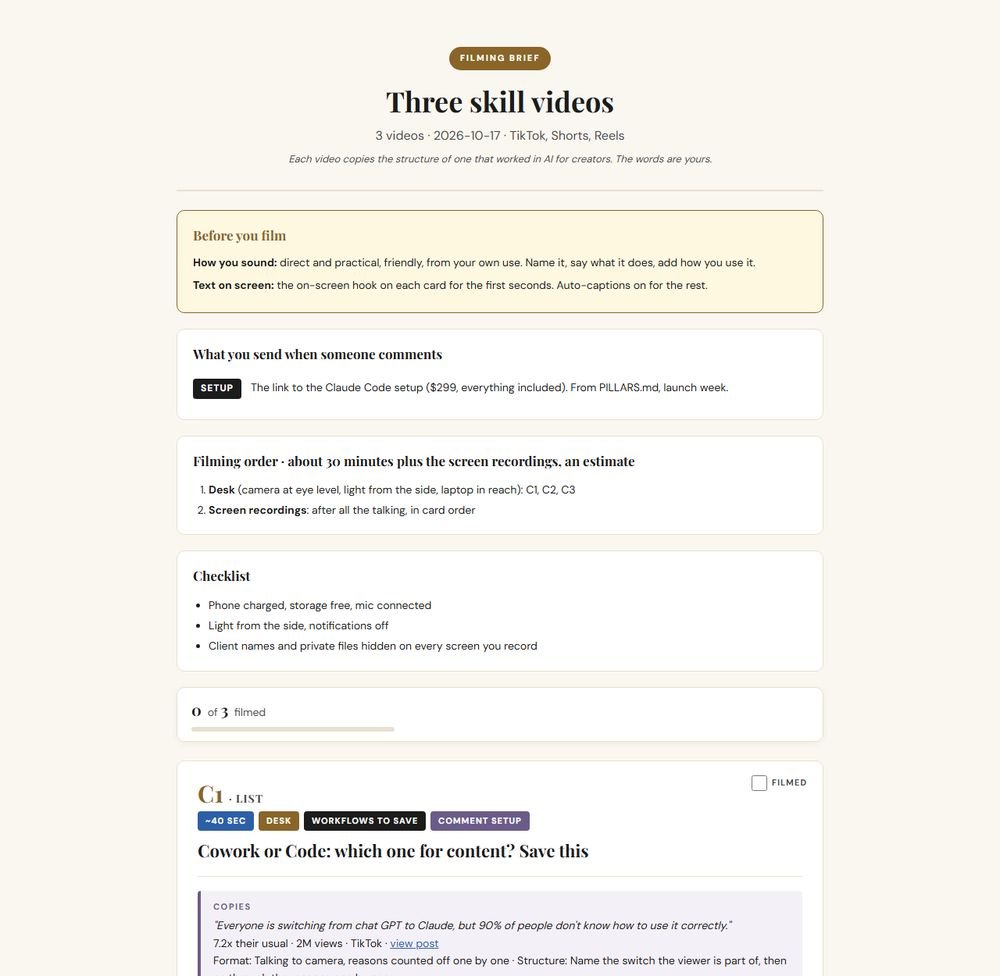
You've seen what's taking off in your niche, but your version comes out sounding nothing like it. AI scripts read like a product page. So every card takes the structure from a video that worked, and the words from you. This is a real one.
Cowork or Code: which one for content? Save this
- 1
What it copies
A video from your niche that beat its creator's usual. The shape, never the words.
- 2
The hook
Plus a second option.
- 3
Every line
Word for word, built from your own rough sentences.
- 4
The close
Your offer, your comment word or your link in bio.
- 5
The shots
What to grab for each line.
- 6
On-screen hook
For people watching with the sound off.
- 7
Caption
And researched hashtags. Facts get checked and linked.
Four takes.
Set it up
Your niche, how you sound, what your videos point to. Then 3 to 10 videos that did better than usual.
Pick topics
From its suggestions, each matched to a video from your niche, or your own.
Talk it through
Rough, like to a friend. Needs a fact only you know? It asks. It never makes one up.
Film and tick
Read each card, film, tick it off. A filming order groups the setups.
Installing the skill takes about two minutes. Works in Claude.ai, Cowork and Claude Code.
Start anywhere.
A few questions, once.
- Your niche, voice and offer
- Paste 3 to 10 videos: link, first words, how it was filmed
- No videos yet? It starts from 200 general hook shapes
It skips the questions.
Strategy / Pillars Creator →Reads your voice, pillars and topic bank.Viral Library →Copies the videos already in your library, hooks word for word.Filming Cards Generator
- The skill, for Claude.ai, Cowork and Claude Code
- Cards that copy videos that worked in your niche
- Lines in your voice, from a few rough sentences per topic
- Topic suggestions, matched to a video from your niche
- Shots, an on-screen hook and a close for every card
- A caption and researched hashtags
- One video to fifty, with a filming order
- A separate setup for each client
- Lifetime updates
- Single-user commercial license, including client work
$47One-time payment. Lifetime license.
Sold through Polar. Instant digital download. 14-day refund.
Questions.
Do I need the Viral Library or the Strategy / Pillars Creator?
No. Filming Cards Generator works on its own: it asks a few setup questions once, and you paste a few videos from your niche. If you have either one, it reads their files and skips the questions they answer.
Is it part of a bigger system?
Yes. It's one step of the Igniting Content Studio, which also finds the videos that worked in your niche, builds your strategy, edits what you film and writes the posts. In the Studio your filming cards build on your library and your strategy, and the setup questions are already answered by the onboarding. The Studio has its own copy of this skill, so what you pay for it on its own isn't taken off the Studio's price. If you think you'll want the whole system, start with the Studio.
Where do I find the videos to give it?
Scroll the bigger accounts in your niche and pick short videos that got clearly more views than their other videos. For each one, copy the link and the first few words they say: TikTok, Instagram and YouTube show a transcript or auto-captions. Add a line on how it's filmed. If you have none yet, it starts from 200 general hook shapes, and you can add videos later.
Will it copy other creators?
No. It takes the shape of the hook, the order of the beats and how the video is filmed. Every word on your card comes from you or from facts it checked.
Do I have to write anything?
A few rough sentences per topic, the way you'd explain it to a friend. It won't write a card with nothing from you, because that's what makes AI scripts sound like AI.
How many videos can I plan at once?
One, a filming day, or up to 50. Big batches go in rounds of 10, all in the same brief, and you can stop after any round.
Can I use it for clients?
Yes. It asks whose videos you're planning and keeps a separate setup for each client. The single-user commercial license covers client work.
On Claude.ai, do I have to do the setup every time?
No. After the setup it gives you one small file. Attach it to your next chat, or add it to a Claude Project, and it skips the setup.
Does it edit or post the videos?
No. It plans what to film and writes the caption. You film, edit and post.
Do I need coding experience?
No. You install the skill once, which takes about two minutes, then talk to Claude normally.
Which Claude plan do I need?
Any paid Claude that supports skills: Claude.ai (Pro, Max, Team or Enterprise), Cowork, or Claude Code.
Refunds?
14 days. Reply to your receipt or email info@theignitingstudio.com and I refund in full.
Want the whole system?
Filming Cards Generator is one step of the Igniting Content Studio, which also finds the videos that worked in your niche, builds your strategy, edits what you film and writes the posts. The Studio comes with its own copy of Filming Cards Generator.
one folder does the whole week:
- find what works
- →
- plan the week
- →
- filming cards
- →
- edit
- →
- posts for every platform
One email a week
Start with my free Claude Code setup guide, then get the tools, workflows and tips I'm using right now. Short, useful, and you can unsubscribe any time.